Music is something that enhances all items of work. Especially your StopFrames! Here I have put in some music and sound effects that just lightens everything up.
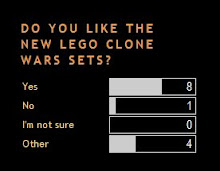
Poll Results
The name says it all...
Tuesday, October 7, 2008

Friday, September 12, 2008
Darth Vader - What is he doing?
We caught lord vader playing around with his lightsaber on security cameras yesterday - The Emperor is going to have a talk with him soon...
A Clone Running Away - Very Cowardly.
Here we have a clone who lacks braveness and a standard clone's willingness to die.
Monday, September 8, 2008
Spider Droid Shooting
Yet another test with the lasers/sound... "yawn"
This time it is for a laser "build-up"
This time it is for a laser "build-up"
This time I didn't use a green screen as it lowers the quality.
Software Downloads
Here are some of the download locations/websites to download some great software for using in your animations:
Animation Software
-------------------------
JPGVideo - http://www.snapfiles.com/reviews/JPGVideo/jpgvideo.html
WAX (2.0) - http://www.debugmode.com/wax
Effects Software
-------------------------
LSMaker - http://lsmaker.uw.hu/page.php - (Includes LS-Sound, LS Text and LS Maker)
Sound Software/Resources
-------------------------
FindSounds - http://www.findsounds.com
Dockingbay101 -http://www.dockingbay101.com/character/
Windows Movie Maker - On all standard Windows Computers
Tips/Helpful Notes
-------------------------
Brickfilms - http://www.brickfilms.com
Animation Software
-------------------------
JPGVideo - http://www.snapfiles.com/reviews/JPGVideo/jpgvideo.html
WAX (2.0) - http://www.debugmode.com/wax
Effects Software
-------------------------
LSMaker - http://lsmaker.uw.hu/page.php - (Includes LS-Sound, LS Text and LS Maker)
Sound Software/Resources
-------------------------
FindSounds - http://www.findsounds.com
Dockingbay101 -http://www.dockingbay101.com/character/
Windows Movie Maker - On all standard Windows Computers
Tips/Helpful Notes
-------------------------
Brickfilms - http://www.brickfilms.com
Hope this helped! :D
Sunday, September 7, 2008
Green Screen Test
This is my first Green Screen test using some software called WAX (version 2.0)
This is my first Green Screen so be nice. :)
Droidika Shooting
Here is a test I did on using different effects, in this case, a sheild.
I made the sheild using Microsoft PowerPoint 2007...
Enjoy.
I made the sheild using Microsoft PowerPoint 2007...
Enjoy.
Lasers were made on LSMaker, but my animating software kind of went "ka-put" so it didn't turn out quite as smoothly or as nicely as expected.

Lego Star Wars Minifigs 2008
There are some awesome new minifigures that have been released...
In order; (from left)
Commander Rex
Asajj Ventress
Manga Guard
Commander Cody
Plo Koon
Ashoka Tano
Obi-Wan Kenobi
Anakin Skywalker

In order; (from left)
Commander Rex
Asajj Ventress
Manga Guard
Commander Cody
Plo Koon
Ashoka Tano
Obi-Wan Kenobi
Anakin Skywalker
Saturday, September 6, 2008
Lego Star Wars Sets 2008
For those of you who don't already know, here are the 2008 Clone Wars sets...
In order,
- MangaGuard Starfighter
- V-19 Torrent
- AT-TE
- Republic Attack Gunship
- Droid Attack Gunship
- Republic Fighter Tank
- Sepratist Spider Droid
- The Twilight
Stop Frame Animation - Effects and Sounds
1. The first thing to do when you've taken all your pictures for your stop frame animation is to then put them on your StopMotion software. In this case, I use JPGVideo.
I haven't put in a video for this one because the file was too big... So skip straight to Shooting Test II
2. The next thing to do is import that into your effects software. For example, Adobe Photoshop or LSMaker. Make your lightsabers, your blaster effects, the explosions... You get it.
Now watch the second video.
3. Then the final thing to do is to add sound. You can do this using Windows Movie Maker, by importing the Video, then importing the Music/Sounds...
And it should come out a bit like this:
Now watch the third video...
I haven't put in a video for this one because the file was too big... So skip straight to Shooting Test II
2. The next thing to do is import that into your effects software. For example, Adobe Photoshop or LSMaker. Make your lightsabers, your blaster effects, the explosions... You get it.
Now watch the second video.
3. Then the final thing to do is to add sound. You can do this using Windows Movie Maker, by importing the Video, then importing the Music/Sounds...
And it should come out a bit like this:
Now watch the third video...
Subscribe to:
Comments (Atom)

